
When someone in Doha searches for a dentist, a car service, a bakery or a salon “near me”, the first thing they usually see isn’t a website. It’s a map with three businesses pinned on it, each with a rating, photos and a button to call or get directions. Those businesses win a large share of local enquiries before anyone scrolls further. Your Google Business Profile in Qatar is what puts you on that map, and for many local businesses it’s the most valuable free marketing tool available.
This guide walks through setting up and verifying your profile, filling it in properly, using photos, posts and reviews, and the factors that influence where you appear. If you’d like a team to manage it alongside your wider search strategy, see mediaSine’s approach to SEO in Qatar.
Why Your Google Business Profile in Qatar Matters?
Your Business Profile is your listing on Google Search and Google Maps. It shows your name, location, hours, phone number, photos, reviews and services, and it often appears before your website does. For shops, clinics, restaurants, gyms and service businesses, it’s frequently the first impression a customer gets.
It also drives action. People can call, message, get directions, visit your website or book directly from the listing, often within seconds of searching. A complete, accurate and active profile turns those searches into visits and enquiries; an incomplete or outdated one sends customers to a competitor down the street.
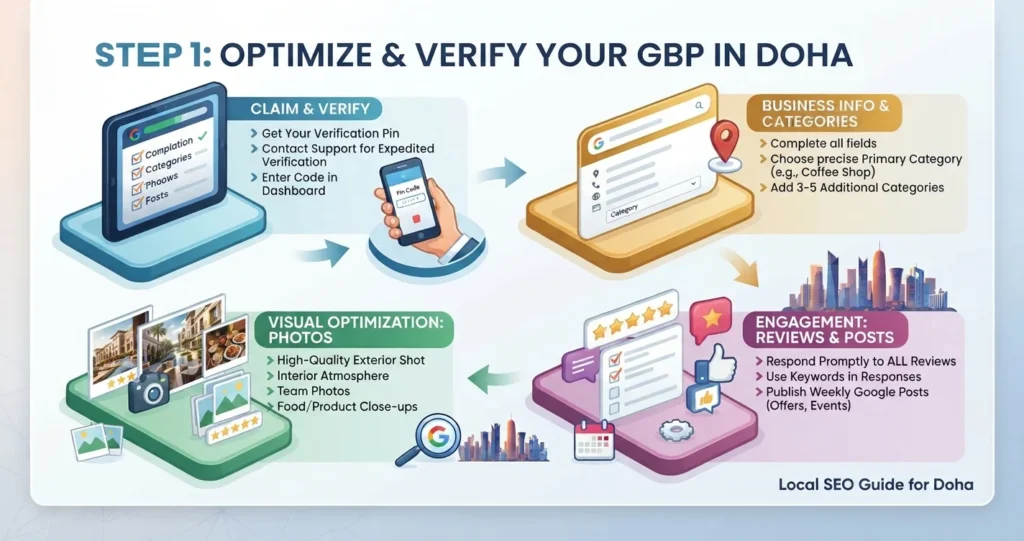
Step 1: Claim and Verify Your Profile
Start by searching for your business on Google Maps. If a listing already exists, claim it; if not, create one through Google Business Profile. Use your real business name exactly as it appears on your signage and documents. Adding keywords or locations to the name, such as “Best Clinic Doha”, can breach Google’s guidelines and risk suspension.
Google will ask you to verify that you own or manage the business. Verification methods vary and can include a video recording of your premises, a phone call, email or other options Google offers at the time. Have your business documents, signage and premises ready, and follow the instructions carefully, because failed verification can delay your listing.
Getting your Qatar address right
Qatar’s addressing system uses zone, street and building numbers, and Google Maps pins aren’t always precise in newer areas such as Lusail or parts of Al Wakrah. Enter your address as accurately as possible, then check the map pin and adjust it to your actual entrance. Add landmarks or directions in your description if your location is hard to find, such as a mall level or a building name. Businesses that serve customers at their location, like cleaning or AC maintenance companies, can set a service area instead of showing a street address.
Step 2: Complete Every Section
Complete profiles generally perform better and convert better. Work through each section carefully.
Categories
Your primary category is one of the most important choices. Pick the most specific category that describes your main business, such as “Dental clinic” rather than “Medical clinic”. Add a few secondary categories for other genuine services, but avoid stretching into areas you don’t actually serve.
Hours, including special hours
Keep regular opening hours accurate, and update special hours for Ramadan, Eid, Qatar National Day and other public holidays. Wrong hours lead to frustrated customers and negative reviews. Ramadan in particular changes opening times for many Doha businesses, so plan the update before the month begins.
Contact details and links
Add your phone number, website, and booking, menu or ordering links where relevant. Many Qatar customers prefer WhatsApp, so make sure your listing makes it easy to reach you in the way your customers like.
Services, products and description
List your main services or products with short, clear descriptions. Write a business description that explains what you do, who you serve and where, in natural language. Keep it accurate and helpful rather than stuffed with keywords.
Arabic and English
Qatar’s customers search in both Arabic and English. Make sure your business name, address and key details are clear for both audiences where Google allows, and respond to reviews in the language the customer used. Arabic visibility is often less competitive, which is worth considering as part of your wider search strategy.
Step 3: Add Photos and Keep Them Fresh
Photos help customers decide and make your listing stand out. Add a clear logo and cover photo, then real images of your exterior, so people recognise you on arrival, along with your interior, products, team and work. Restaurants should add menu and dish photos; clinics and salons should show treatment rooms and the reception area. Add new photos regularly rather than uploading everything once; a steady stream of recent images signals an active business and gives returning visitors something new to see. Use genuine images rather than stock photos, which customers quickly see through.
Step 4: Build and Manage Reviews
Reviews influence both rankings and trust. The number of reviews, their ratings and how recently they were posted all matter to customers comparing businesses.
Ask for reviews the right way
Ask satisfied customers to leave a review, for example with a QR code at the counter, a link in a follow-up WhatsApp message or a card with the receipt. Make it easy, but never offer discounts or gifts in exchange for reviews, and never buy or fake reviews. These practices breach Google’s policies and can lead to reviews being removed or your profile being penalised.
Respond to every review
Thank customers for positive reviews, and respond calmly and helpfully to negative ones. A thoughtful reply to a complaint, offering to resolve the issue, often reassures future customers more than a dozen five-star ratings. Reply in Arabic or English to match the reviewer.
Step 5: Use Posts and Updates
Google Business Profile lets you publish updates such as offers, events, new products and announcements. Regular posts keep your listing active and give customers a reason to choose you now. Share seasonal menus, Ramadan hours, National Day offers or new services. If you promote discounts or giveaways, remember that promotional offers in Qatar can require approval from the Ministry of Commerce and Industry.
How Google Maps Ranking in Doha Works?
Google says local results are based mainly on three factors: relevance, distance and prominence. Understanding them helps you focus your effort on Google Maps ranking in Doha.
Relevance
How well your profile matches what someone is searching for. Accurate categories, services and descriptions all improve relevance.
Distance
How far your business is from the person searching, or from the location in their search. You can’t change your location, but an accurate pin and service area help Google show you to the right people.
Prominence
How well known and trusted your business is. Reviews, ratings, links and mentions across the web, and your website’s overall visibility, all contribute. This is where strong local SEO in Doha connects your profile with your website: local landing pages, consistent business details and helpful content all support prominence.
Connecting Your Profile and Your Website
Your Business Profile and website work best together. Make sure your business name, address and phone number match exactly across both, and across other directories you use. Inconsistent details confuse search engines and customers alike. Link your profile to the most relevant page on your site, such as a branch or service page rather than always the homepage. Add clear location information, opening hours and a map to your contact page. For multi-branch businesses, create a separate profile for each genuine location, with its own page on your website.
An Example: A Restaurant in Doha
Picture a casual restaurant in Msheireb with a basic listing: few photos, old hours and a handful of unanswered reviews. The owner updates the primary category, adds the correct map pin and entrance details, uploads fresh dish and interior photos, links the menu and WhatsApp, and sets special hours ahead of Ramadan. Staff hand out a QR code asking happy guests for reviews, and every review gets a reply. A weekly post shares new dishes and offers. Over the following months, the listing appears more often in nearby searches, and calls and direction requests rise. This is an illustrative scenario, not a client example. For a wider view of how Maps fits with social media and delivery apps, see our guide to restaurant marketing in Doha.
Measuring Results
Your profile’s performance data shows how people find you and what they do: searches and views, calls, direction requests, website clicks, messages and bookings. Review it monthly, and note any unusual spikes or drops alongside what changed that month. Compare changes after updates to photos, categories or posts, and track how many new customers mention finding you on Google. Combine this with website analytics for a fuller picture of local search performance.
Common Mistakes to Avoid
Common errors include adding keywords to the business name, choosing a vague primary category, leaving outdated hours during Ramadan and holidays, ignoring reviews, using only stock photos, creating duplicate listings for the same location and letting business details differ between the profile and the website. Fixing these is often the fastest way to improve local visibility, because so many competitors leave their Google Business Profile in Qatar half finished.
Make Your Profile Work for You
An optimised Google Business Profile in Qatar is one of the simplest, most cost-effective ways to win local customers. Claim and verify it, complete every section accurately, keep photos and hours fresh, build and respond to genuine reviews, post regularly and connect it to your website. Do that consistently, and your business will be easier to find, easier to trust and easier to choose.
Get a local SEO check
mediaSine can review your Google Business Profile and local search visibility in Qatar and show you what to improve first.
Frequently Asked Questions
Yes. Creating and managing a Business Profile is free. Some businesses choose to pay for management support or local ads, but the profile itself costs nothing.
Once verified, your listing can appear fairly quickly, but ranking well for competitive searches takes longer and depends on relevance, distance and prominence.
Yes, if you serve customers at their location. Service-area businesses can hide their address and show the areas they serve instead.
Reply in the language the customer used. It shows respect and makes your responses useful to other customers reading them.
