
It’s 4 pm on a Thursday, service starts in two hours, and nobody has posted anything since Monday. Someone grabs a photo of the special, writes a quick caption and hopes for the best. Most restaurants run their social media this way, and most of them know it isn’t working. A restaurant content calendar fixes the problem at its root: you decide what to post before the week starts, so posting becomes a routine instead of a scramble.
This guide comes with a free, ready-to-use template built for restaurants and cafés in Lebanon, including a seasonal calendar of Lebanese occasions. It walks you through filling it in, step by step. If you’re looking for the bigger picture first, what to post and why, start with our guide to Instagram marketing for Beirut restaurants, then come back here to plan it.
Why a Restaurant Content Calendar Beats Posting on the Fly?
Posting on the fly feels flexible, but it costs more than it saves. Content gets made in a rush, so it looks rushed. The same few dishes appear again and again because they’re the easiest to photograph. Big dates sneak up, and the Valentine’s Day set menu gets announced two days before, when most couples have already booked elsewhere.
A restaurant content calendar changes the rhythm. You plan a month at a time, batch your shoots, give every post a purpose and spread your content across the things that actually bring guests in: food, atmosphere, people, offers and reviews. You still have room for spontaneous Stories, a celebrity walks in, the first strawberries of the season arrive, but the backbone of your feed is decided in advance.
There’s a quieter benefit too. When the plan is written down, anyone on the team can execute it. Social media stops depending on one person’s mood or memory.
What’s Inside the Free Template?
The template is a spreadsheet you can open in Excel or Google Sheets. It has five tabs, each designed to answer one planning question.
How to Use explains the steps and which cells to edit. Monthly Calendar is the main planner: type the first day of the month and the dates and weekdays fill in automatically, with columns for platform, format, content pillar, topic, caption language, assets needed, owner and status. Content Pillars holds your five themes and a suggested balance between them. Lebanon Seasonal Hooks lists occasions through the year with content ideas and when to start planning each one. Monthly Review tracks what you published and what worked, with planned and published counts calculated from the calendar.
Download the free template. Get the restaurant content calendar template (.xlsx) Free.
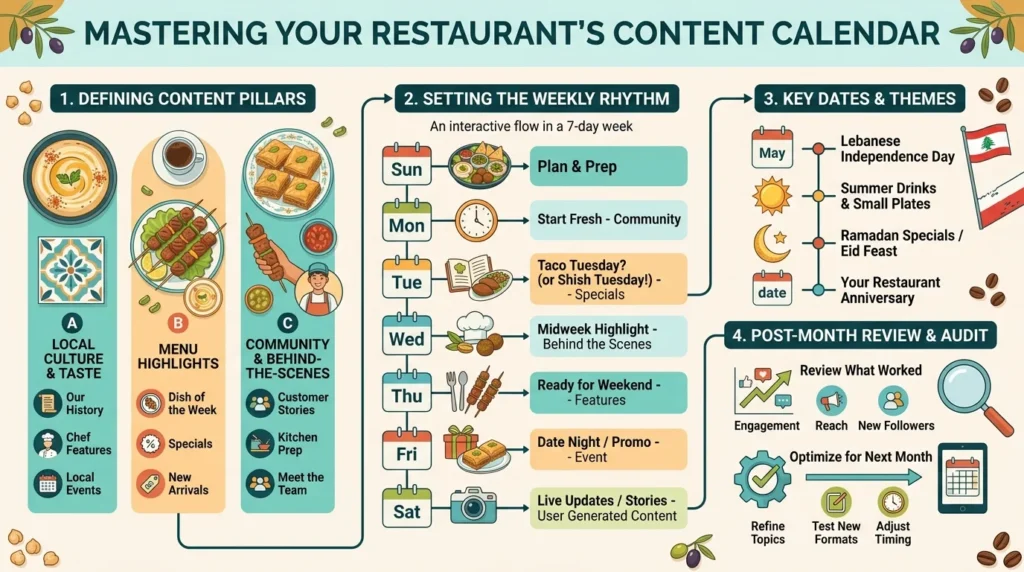
Step 1: Set Your Content Pillars
Content pillars are the recurring themes your posts rotate through. Without them, restaurants tend to post only food, which gets repetitive, or only offers, which makes the feed feel like an advertisement. The template comes with five pillars that suit most restaurants and cafés.
The five pillars in the template
Signature food and drink covers the dishes and drinks people come for, and it should carry the most weight. Atmosphere and experience shows the space and the mood: the terrace at sunset, a full room on a Friday night. People and behind the scenes introduces the chef, the team and the kitchen. Offers and events gives people a reason to visit now. Guests and reviews shares what guests say and post about you.
The template suggests a starting balance, with signature food at around 30 percent and the others between 15 and 20 percent each. Treat this as a starting point. A cocktail bar might give atmosphere more space; a bakery might lean further into food. The calendar’s summary shows your actual balance against the target, so you’ll notice if one pillar takes over.
Step 2: Map the Month’s Occasions
Before filling in everyday posts, mark the dates that matter. Occasions drive bookings, and they need content well in advance because people plan special meals early.
Plan the big dates first
Lebanon’s dining calendar is full. Valentine’s Day, Mother’s Day on 21 March, Western and Orthodox Easter, Independence Day on 22 November, Christmas and New Year’s Eve all create demand for set menus and group bookings. Summer brings visitors and returning Lebanese living abroad, which shifts the audience and often the language of your content. The template’s seasonal tab lists each occasion with content ideas and a “plan from” date, so you start promoting before your guests start deciding.
Here’s how that looks in practice for Valentine’s Day. In mid-January, you’d add a teaser Story to your restaurant content calendar hinting at a set menu for two. In early February, a carousel announces the menu and price, followed by a dessert Reel the next week. In the final days, Stories count down the remaining tables. Four or five planned pieces of content, spread over a month, do far more than one rushed post on the 12th.
Lunar dates move every year
Ramadan and the two Eids follow the lunar calendar, so their dates shift by around eleven days each year. In 2027, Ramadan is expected to begin in early February and Eid al-Fitr to fall in early March, but the exact dates depend on official announcements. Check them each year and plan iftar and suhoor content several weeks ahead. Add local events too: a festival in your neighbourhood or a big match night can matter more to your restaurant than a national date.
Step 3: Build a Weekly Rhythm
A good social media calendar template for a restaurant needs a weekly rhythm as well as a monthly view. Give each day a job, and the empty-feed problem disappears.
A sample week for a restaurant
- Monday: behind-the-scenes or meet-the-team post
- Wednesday: signature dish Reel to start building weekend demand
- Thursday: weekend offer or event post with a booking prompt
- Saturday: atmosphere content from Friday night
- Daily Stories: today’s special, guest reposts, last-minute tables
A sample week for a café
A café content plan runs on a different clock, because cafés depend on mornings, routines and regulars. Lead with breakfast and coffee content early in the day, feature new pastries or seasonal drinks midweek, and use weekends for brunch and lingering. Remote workers and students are often part of a café’s audience, so posts about Wi-Fi, quiet corners or opening hours can be surprisingly effective. Keep Stories frequent and casual, since café customers often check them on their way in.
Step 4: Batch Your Shoots
The single biggest time saver in any restaurant content calendar is batching. Instead of photographing something every day, schedule one or two focused shoots a month, ideally at a quiet hour with good light, and capture most of your feed content at once.
Before the shoot, use the “Assets needed” column to build a shot list from the month’s plan: the three dishes you’ll feature, the new cocktail, the terrace, a team portrait, a few short videos for Reels. Shoot each dish as a still photo and a short video, and film some extra footage for later. One well-planned shoot can supply a month of feed posts, leaving Stories for spontaneous, everyday moments.
Step 5: Assign, Approve and Schedule
A plan only works if someone owns each post. The template’s “Owner” and “Status” columns make this visible: every post moves from Idea to Drafted to Approved to Scheduled to Posted. A quick glance tells you what’s ready and what’s stuck.
Agree who writes captions, who approves them and how far ahead posts are scheduled. Many restaurants find it easiest to approve the whole week’s posts on Monday morning, then schedule them so they publish automatically. Use the “Caption language” column to decide in advance whether a post goes out in English, Arabic, French or a mix, rather than deciding at the last minute.
Step 6: Review the Month
At the end of each month, fill in the Monthly Review tab. It pulls planned and published counts from the calendar and asks for a few numbers from your Instagram insights: saves, shares, profile actions such as calls and directions, and DMs. Add how many bookings came from social media, which you can find out simply by asking guests how they heard about you.
Then answer two questions: what was the best-performing post, and what will you change next month? Over three or four months, this short review turns your restaurant content calendar from a schedule into a system that improves itself. You’ll see which pillars bring bookings, which formats reach new people and which days your audience responds to.
Common Restaurant Content Calendar Mistakes
A calendar helps only if it’s realistic. The most common mistake is planning too much: daily feed posts on three platforms look impressive on paper and collapse by week two. Start with a rhythm you can sustain and add more once it becomes routine.
The second mistake is treating the calendar as fixed. Leave space for spontaneous moments, and move posts around when something better comes up. The third is ignoring the review. Without it, you’ll keep repeating what you’ve always done rather than what actually works. And the fourth is forgetting the big dates until they’re days away, which is exactly what the seasonal tab is designed to prevent.
Frequently Asked Questions
Plan the main feed posts a month ahead and review them weekly. For big occasions such as Ramadan, Christmas and New Year’s Eve, start planning six to eight weeks in advance, because guests book those meals early.
Three to four feed posts or Reels a week, plus Stories on service days, is a realistic rhythm for most restaurants. Consistency matters more than volume.
Yes. Upload the file to Google Drive and open it with Google Sheets. The dates, dropdowns and summary counts work in both Excel and Google Sheets.
Yes. The Platform column includes Instagram, TikTok, Facebook, Snapchat and Google Business Profile, so you can plan all your channels in one place.
Turn Planning Into Bookings
A restaurant content calendar won’t make your food taste better, but it will make sure people see it at the right moment. Set your pillars, mark the big dates early, give each day a job, batch your shoots and review every month. Do that consistently, and social media stops being a daily scramble and starts filling tables.
Download the template, or ask us to run it.
If you’d rather spend your time running the restaurant, mediaSine can plan, shoot and manage your monthly content for you.
